



Send your CDP data to any tool with the CDP Export API
30 October 2026
Your Raptor CDP already brings customer data together to build precise audiences. With the CDP Export API, you can send those audiences, and the data on each customer in them, to any tool your teams use.
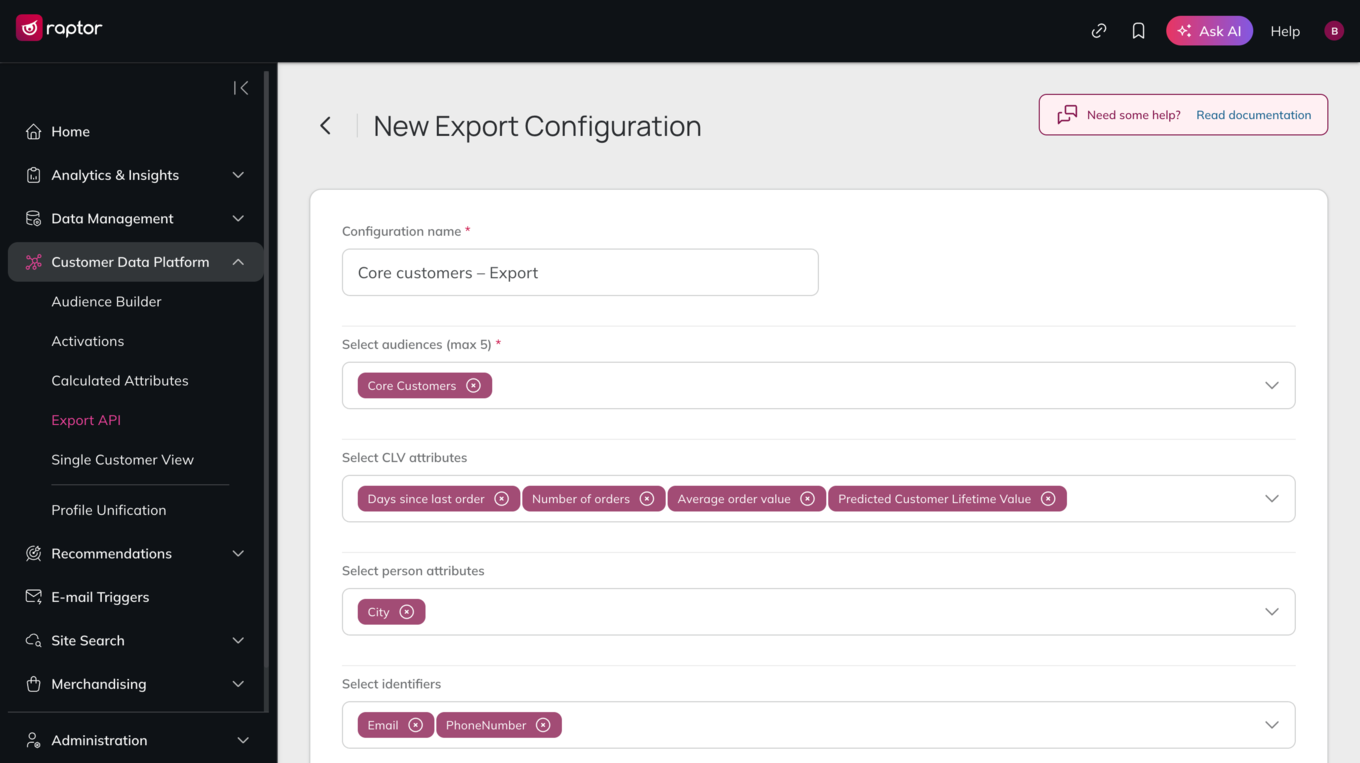
Choose what to send:
- Audiences: such as frequent buyers or serial returners.
- CLV attributes: such as predicted future value, historic value or the probability that a customer is still active.
- Person attributes: such as name, age or postcode.
- Identifiers: such as email address, phone number or user ID.
- Calculated attributes: such as number of purchases in the past month or top favourite brands.
The receiving system is then kept up to date as people join, change or leave your selected audiences, so all your tools stay in sync with one customer view. Use cases include:
- Customer service: send audiences like high-value customers or serial returners to your helpdesk, and use the Single Customer View to look up any profile and get its attributes instantly. Agents know who they're talking to and can decide on refunds or goodwill gestures accordingly.
- Sales and account management: sync your most valuable customers and their CLV into your CRM, so account managers know which customers to prioritise.
- Retention: send customers whose probability of staying active is dropping to your retention team's tools, so they can act before those customers are lost.
- Reporting: send audiences and CLV predictions to your BI software, so management can track the value of each audience without manual exports.
- Loyalty and rewards: feed your loyalty platform with each member's audiences and predicted value, so benefits and offers reflect what each customer is worth.
Setting up an export is quick, with an intuitive interface you can find under Customer Data Platform > Export API. Just name your export and pick the audiences and data to include. You can then connect it to the tools you need.
Find the full technical documentation here.
Any questions or feedback? Don’t hesitate to get in touch at [email protected].