



Personalization
Personalization API: how to deliver personalisation through your stack
5 min - 16 November 2026

A personalization API connects personalisation logic to the experience where a customer actually sees the result. Instead of hard-coding recommendation or ranking logic into a website, app or search engine, the experience can request relevant output from a specialised service and decide how to render it.
For ecommerce teams, this separation is useful because customer behaviour and recommendation logic change continuously, while the storefront still needs predictable performance, fallbacks and business control.
What is a personalization API?
A personalization API is an interface that allows a digital application to request or retrieve data used to personalise an experience from customer, behavioural or contextual signals. Depending on the implementation, that may be a recommendation response, ranked items, user embeddings or other structured data that the consuming system uses to determine what the customer sees.
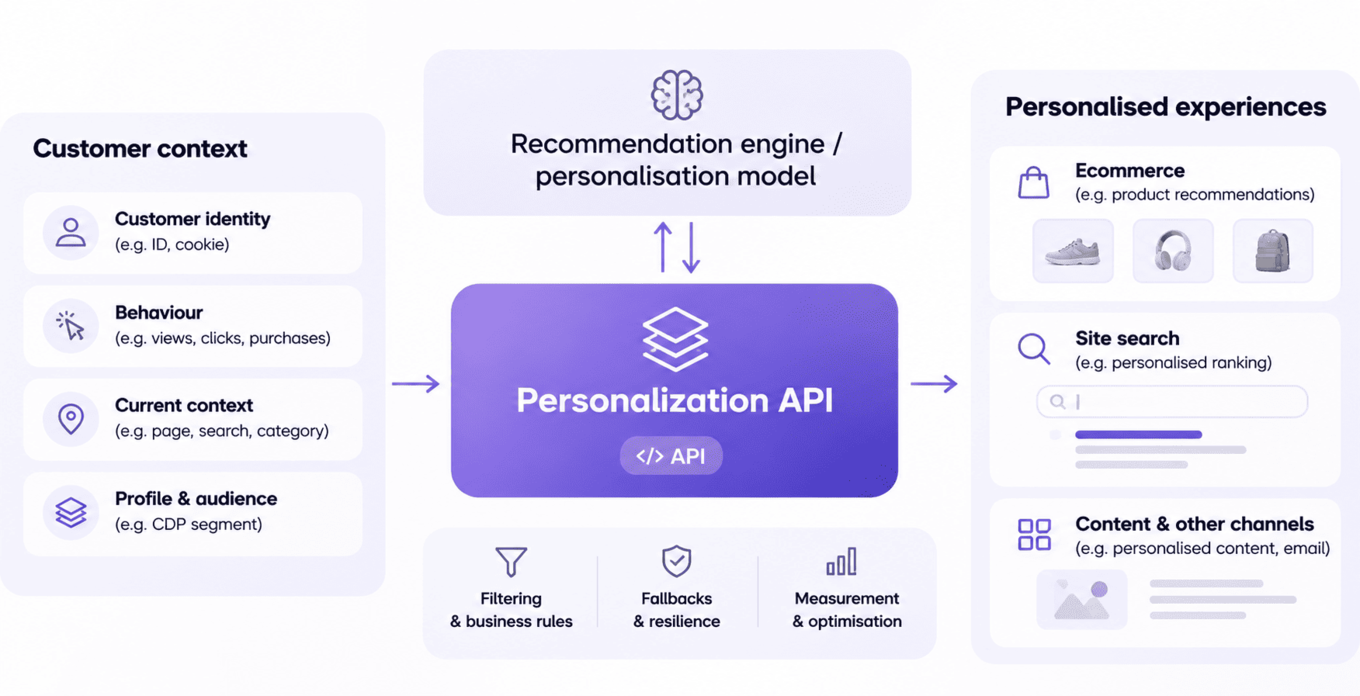
The API is the delivery mechanism. The personalisation model or recommendation engine remains responsible for calculating relevance. The website, app, search engine or email system remains responsible for presenting the result in the appropriate customer experience.
How a personalization API typically works
1. Capture or access customer context. The request needs enough information to identify the customer, session or context, such as a customer ID, cookie ID, current page or search context.
2. Call the appropriate endpoint or module. The application requests a defined output, for example a set of recommended products or personalisation data for search ranking.
3. Receive a structured response. APIs commonly return IDs, scores, attributes or other structured data rather than final HTML.
4. Apply business rules, filters and fallbacks. Availability, category constraints, exclusions and merchandising rules may need to influence what can actually be shown.
5. Render the experience in the frontend or connected channel. The consuming system controls layout, placement and interaction design.
6. Measure the outcome. Tracking should connect exposure and interaction back to the relevant module or use case so performance can be evaluated.
What should the API request contain?
The exact request depends on the use case, but useful inputs often include an identifier, the current context and any parameters that limit or shape the output. For anonymous visitors, a cookie or session identifier may be the only available signal. For known customers, richer profile context can be available.
Avoid sending more data than the use case requires. A clean contract between the experience and the personalisation service makes integrations easier to test, monitor and evolve.
Latency, fallback and resilience matter
Personalisation should not make the core customer journey fragile. API integrations need explicit timeout and fallback behaviour so a slow or unavailable response does not block the page or search experience.
Fallbacks can be contextual rather than personalised, such as popular products in a category or another safe default. The important point is to design failure behaviour deliberately rather than assume every request will succeed.
Filtering and business control
Relevance alone is not enough. Products may need to be excluded because they are unavailable, inappropriate for the context or outside a campaign. Raptor documents both filtering on the customer side after receiving API output and OData filtering before results are returned.
Recommendation modules can also work with merchandising and CDP audience checks, allowing commercial priorities and audience logic to shape the final output.
How Raptor exposes personalisation through APIs
Raptor documents API-based implementations for website recommendations and search personalisation. Recommendation modules can be called from an ecommerce implementation, while Search Personalization can expose item and user embeddings or recommendation endpoints for integration with a search engine.
The Search Personalization implementation is a useful example of the operational detail an API evaluation should cover. Raptor documents versioned customer-specific models, item embeddings loaded into the search index, user embeddings generated from recent history, bearer-token authentication (tokens expire after 300 seconds, so long-running processes must re-authenticate) and a recommendation to pre-fetch and cache user embeddings so they do not add latency at query time. Only one version of a model is active at a time, and rollouts happen overnight so item and user embeddings stay aligned. These details belong to the integration layer, not to the general definition of personalisation itself.
These are concrete API integration patterns within the wider Raptor personalisation stack. The exact endpoint, authentication and module depend on the capability being implemented, so technical teams should use the current Help Center and Control Panel documentation for implementation details.
Recommendation API and Search Personalization API compared
Raptor documents two distinct integration patterns. They should not be confused with each other or presented as one product:
Website Recommendations: the application requests recommended products from a recommendation module, authenticated with the account’s customer ID and the module’s API key, and renders the result itself.
Site Search Personalization: item embeddings are loaded into the search index and the application fetches a user embedding from the API to personalise ranking. Raptor’s hosted Typesense setup is the default, and a customer’s own search engine can be used if it supports vector search. The implementation partner fetches and caches user embeddings and sets how strongly personalisation influences each query, with text relevance kept as a guardrail.
Neither is a single “Personalization API” product. They are two implementations of the same pattern, so the right documentation depends on the use case.
What to evaluate in a personalization API
When comparing approaches, look beyond whether an API exists. Evaluate response time, fallback options, identity handling, filtering, business-rule support, measurement, documentation, authentication, versioning and how tightly the integration couples your frontend to the personalisation provider.
A good API design gives product and engineering teams enough control to integrate safely while allowing marketing and ecommerce teams to improve relevance without rebuilding the experience layer every time recommendation logic changes.