



Personalization
Email triggers: how behavioural email automation works
7 min - 16 November 2026
Email triggers automatically start an email flow when a customer takes a relevant action or when something changes around a product they have shown interest in.
For ecommerce teams, this creates a simple advantage: communication can respond to actual customer intent instead of relying only on scheduled campaigns. A shopper leaves products in their basket. A product they viewed drops in price. An item comes back into stock. Each event can become the starting point for a relevant email.
What are email triggers?
An email trigger is an event or behavioural signal that starts an automated email workflow. Common ecommerce signals include:
- viewing a product several times;
- showing repeated interest in a category or brand;
- adding a product to favourites;
- abandoning a basket;
- a product dropping in price;
- a product coming back into stock.
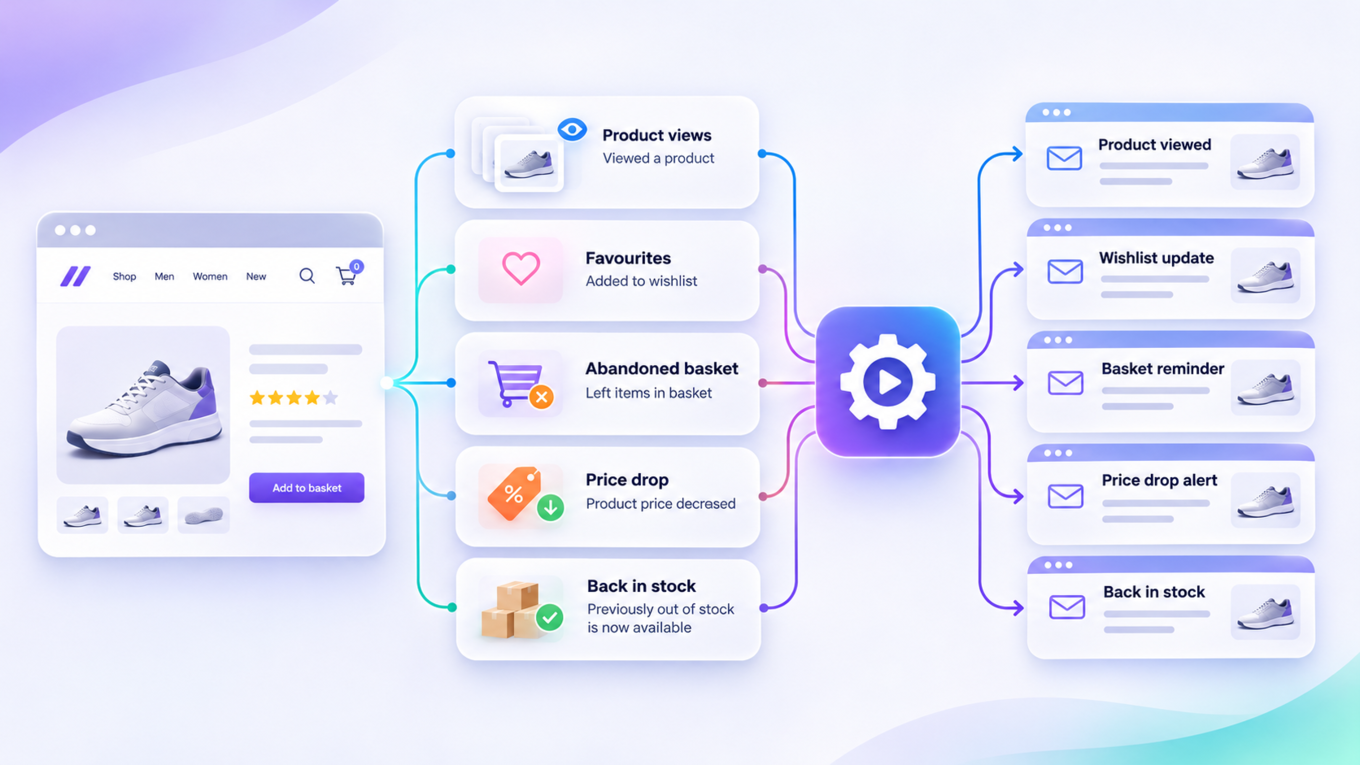
The trigger identifies the moment when communication may be useful. Rules then determine whether the customer qualifies, when the workflow should run and which information the email should contain.
How do behavioural email triggers work?
A typical behavioural trigger involves four stages.
1. Capture customer behaviour
The first step is to understand what the customer does. Useful signals can include product views, searches, favourites, basket activity and purchases. The closer that behaviour is to a purchase decision, the stronger the intent signal may be. Someone browsing a category provides useful context. Someone who adds a product to their basket provides a much stronger indication of purchase intent.
2. Check the trigger conditions
One action should not automatically generate an email every time. The trigger logic can apply conditions such as:
- how many times the customer viewed the product;
- whether they already purchased it;
- how recently the action happened;
- whether another trigger already contacted them;
- whether the product still meets the relevant business rules.
This helps keep triggered communications relevant and controls email pressure.
3. Enrich the event with useful data
The trigger can pass more than a simple event. Product information can help the email display the item the customer viewed or left behind, including relevant information such as its name, image or price. Recommendation data can add related products or alternatives based on the customer's behaviour.
4. Pass the trigger to the email platform
The email marketing platform then uses the trigger and associated data to create and send the communication. This distinction matters when evaluating a trigger solution. Raptor works with an organisation's existing email marketing platform. It detects and enriches behavioural trigger events, while the connected email system manages the email send.
What are the main types of ecommerce email triggers?
Different trigger types reflect different levels of customer intent.
Product interest
Repeated product views can indicate interest even when the customer has not added anything to their basket. A product interest trigger can reconnect with that customer while the product is still relevant.
Category or brand interest
Sometimes the pattern appears across several products rather than one specific item. Repeated browsing within a category or brand can support communication around that broader interest.
Abandoned basket
Basket abandonment provides one of the clearest signals of purchase intent. The customer selected a product and moved further into the buying journey without completing the transaction. A triggered email can remind them what they left behind.
Abandoned favourites
Saving a product can also indicate intent. An abandoned favourites trigger provides another way to reconnect when the customer has shown clear interest without reaching the basket.
Price drop
Price can influence purchase decisions. When the price of an item changes, a trigger can identify customers who previously showed interest and pass that event into the email workflow.
Back in stock
A customer may leave because the product they wanted was unavailable. A back-in-stock trigger can reconnect when availability changes.
Behavioural triggers vs scheduled email campaigns
Scheduled campaigns start from a marketing calendar.
Triggered emails start from an event. Both have a role. A newsletter can announce a new collection to a broad audience. A behavioural trigger can respond to a specific customer's interest in one of those products. The difference is context.
Triggered communication uses recent customer behaviour to decide when a message becomes relevant.
Why use email triggers in ecommerce?
Reach customers when intent is visible
Customer intent changes quickly. Behavioural signals help teams respond while the customer's interest is still current.
Reduce repetitive campaign work
Once trigger logic and email templates are configured, the workflow can run without marketers manually creating a campaign for every qualifying customer.
Make emails more relevant
The trigger provides context about what the customer was doing. That context can shape the content of the email and the products it contains.
Connect website behaviour with email
Triggered emails create a bridge between on-site behaviour and an established CRM or email channel. The customer's browsing activity can therefore influence what they receive after leaving the site.
Email triggers and product recommendations
Triggers determine when a communication should happen. Recommendations can help determine what else the customer should see inside that communication. For example, an abandoned basket email can show the products the customer left behind and add relevant alternatives or complementary items.
A category interest email can include products selected according to the customer's browsing history. Combining the two capabilities helps move from a simple reminder to a more personalised ecommerce experience.
What should you measure?
Trigger performance should be measured by use case. Relevant metrics can include:
- open rate;
- click-through rate;
- conversion rate;
- revenue per email;
- recovered baskets;
- unsubscribe rate;
- number of customers entering each trigger flow.
Comparing every trigger against one overall email benchmark can hide important differences.
A basket trigger and a category-interest trigger address customers at different stages of intent and should be evaluated accordingly.
How should you manage multiple triggers?
As trigger coverage grows, customers may qualify for several communications at the same time. Teams therefore need rules around frequency and priority. A customer who abandoned a basket may also qualify for a product-interest or category-interest email. The organisation needs to decide which communication has priority.
Useful controls include:
- sending limits;
- trigger priority;
- execution order;
- exclusions;
- grouping related triggers;
- purchase-based disqualification.
These rules help prevent several automated messages from competing for the same customer.
How Raptor handles email triggers
Raptor, the Agentic Customer Data Platform, uses behavioural data to identify moments when an email trigger should activate. Raptor tracks interactions such as product visits, favourites, basket activity and purchases. Depending on the trigger, product-feed changes such as a price reduction or an item returning to stock can also create an event.
Raptor can enrich the trigger with customer and product information before passing it to the organisation's existing email marketing platform. The platform currently supports trigger scenarios including abandoned basket, product and category interest, favourites, price drop and back in stock. Email Recommendations can also be combined with triggers to add personalised product suggestions to the message.
What does this look like in practice?
Imerco combines customer data and behavioural email triggers across a business with more than 165 physical stores and an online shop. Raptor currently reports a 74% open rate on triggered emails, €1.25 in revenue per email and an approximately tenfold increase in click-to-open rate for the case.
The example shows why trigger performance depends on context. The value comes from connecting a meaningful customer signal with relevant content at the right moment.
How to evaluate an email trigger solution
When comparing trigger capabilities, ask:
- Which customer behaviours can create a trigger?
- Can product-feed changes trigger workflows?
- How are anonymous and known customer interactions handled?
- Can you define timing and qualification rules?
- Can teams control email frequency?
- Can triggers be prioritised when several qualify?
- Which product and customer data can be passed to the email platform?
- Can recommendations be included?
- Which email platforms can receive the trigger?
- How is performance measured by trigger type?
The best starting point is a small set of high-intent use cases with clear success metrics. Abandoned baskets, product interest, price changes and stock availability provide practical places to begin. As the trigger strategy grows, the priority becomes maintaining relevance across the full set of automated communications.